GPU electricity cost calculator
Big machines. Real numbers.
Explore an NVIDIA H100, an eight-GPU server, HGX B300 or a GB300 NVL72 rack. Estimate electricity costs with power, PUE, energy rates and hours—then compare the hardware behind the numbers.
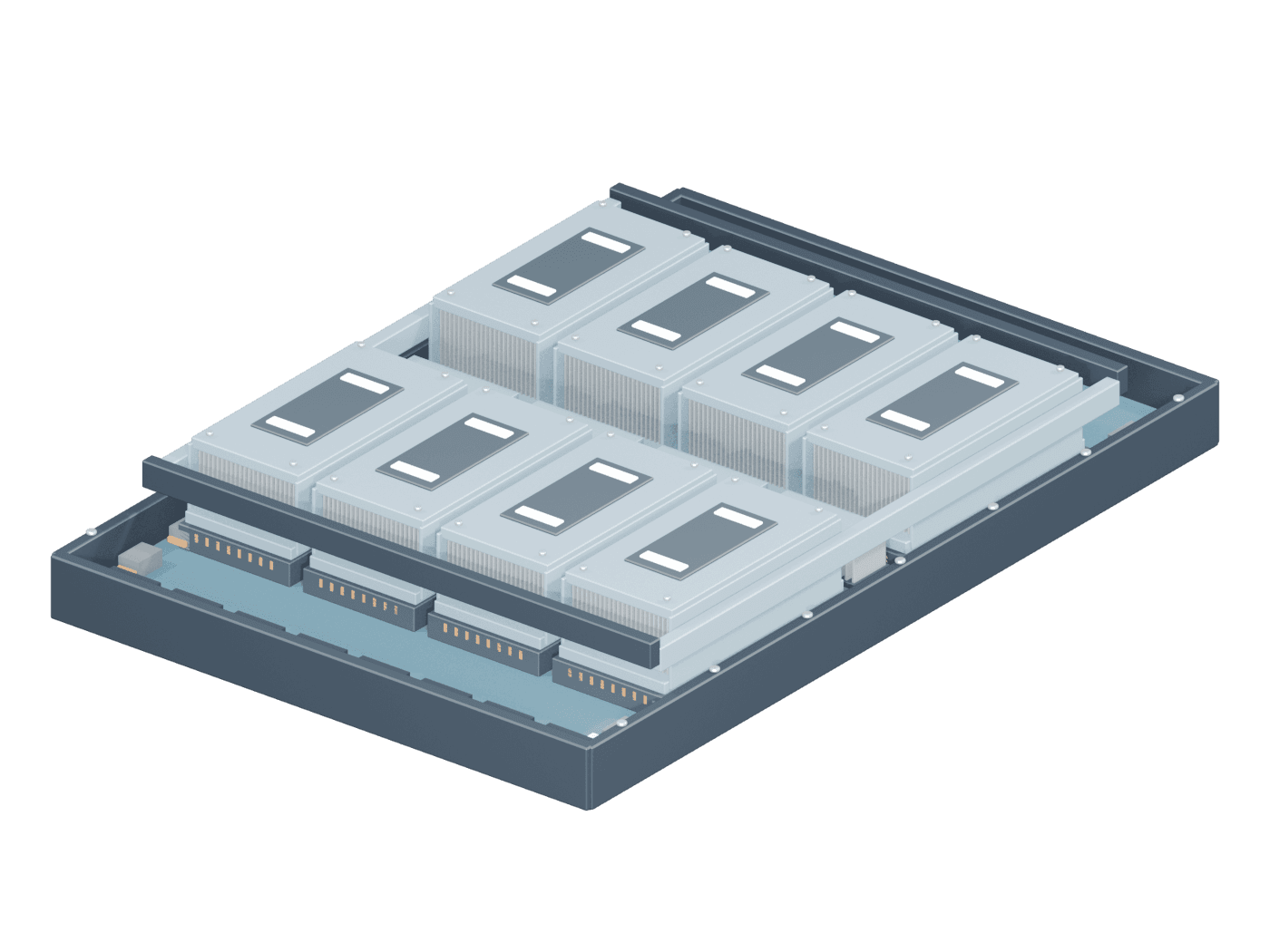
Blender render · open 3D to turn it around
Eight H100 modules. One shared machine.An illustrative GPU tray with shorter silver heatsinks. CPUs, fans and enclosure are omitted; the power input still covers the complete server.
Make it your scenario.
Editable assumptions, not a measurement. Power basis & exclusions ↗
Electricity only—not hardware, rent, staffing, financing or total operating cost.
GPU-hour capacity
GPU-hours
1 server × 8 GPUs per server × 730 hours
If all GPUs are available. Not measured usage or billed hours; different GPU types are not equivalent.
No black box. Just multiplication.
Every number follows your inputs ↑01 · IT power
10.2 kW
1 × 10.2 kW per unit
02 · Facility power
12.24 kW
10.2 kW × 1.2 PUE
03 · Energy used
8,935.2 kWh
12.24 kW × 730 hours
04 · Electricity bill
$893.52 USD
8,935.2 kWh × $0.1/kWh
02 / A little closer
What’s inside the machine?
Following your selection: 8 × H100 server
Change hardware ↑
Hardware capacity · per server
NVIDIA specs ↗8
physical GPUs per unit
More accelerators, not a different definition of a GPU-hour.
640 GB
aggregate GPU memory
8× the GPU memory of one H100
7.92 PFLOPS
BF16 dense Tensor Core peak
8× the theoretical compute of one H100
Your quantity: 8 GPUs · 640 GB GPU memory · 7.92 PFLOPS theoretical total
Compared with one H100 SXM 80 GB (989.5 TFLOPS dense BF16). PFLOPS = quadrillion floating-point operations/sec. Theoretical sums, not application speed; GPU memory is not automatically pooled. Sources & conversion basis
It holds a model’s weights and working state. A model can fit in memory and still be too slow for your application.
A peak arithmetic rate under a particular precision—not tokens per second, concurrent users or a speed guarantee.
An illustrative GPU tray with shorter silver heatsinks. CPUs, fans and enclosure are omitted; the power input still covers the complete server.
The contract side of this
A rack is a power promise.
Enough room doesn’t mean enough cooling. Your colocation agreement needs to say how much power each rack can draw—and whether you pay for IT energy or facility overhead too.
Read the colocation pre-signing checklist ↗Sources, assumptions & things we left out
Eight H100 SXM 80 GB GPUs. Power is a whole-server illustration: GPUs, CPUs, memory and fans; external networking is excluded. Memory and FLOPS are sums across the eight GPUs, not a single shared allocation or a measured application speed.
Manufacturer source ↗
Derived from 8 × NVIDIA H100 SXM: 8 × 80 GB = 640 GB GPU memory; 8 × (1,979 ÷ 2 ÷ 1,000) = 7.916 PFLOPS dense BF16. The 10.2 kW whole-server assumption is not established by this GPU source. Checked 2026-10-23.
Comparison baseline: H100 SXM accelerator ↗
NVIDIA H100 SXM specifications: 80 GB GPU memory and 1,979 TFLOPS BF16 Tensor Core with sparsity. Dense reference = 1,979 ÷ 2 ÷ 1,000 = 0.9895 PFLOPS. Maximum TDP is up to 700 W. Checked 2026-10-23.
Power is held constant for your selected hours. PUE adds an illustrative share for cooling and other facility losses. Neither predicts workload draw. Unsourced server/rack power defaults need verification against your vendor’s system figures; maximum TDP is not average consumption. Displayed values are rounded; calculations use full precision. No revenue or investment return is modeled.
Original Blender reconstructions informed by product references, not manufacturer CAD, exact OEM layouts or engineering dimensions. Heatsink height is a visual distinction, not a performance scale. The HGX B300 tray is not a compute tray inside GB300 NVL72. The exposed H100 module is a reference view, not operation without cooling.
Manufacturer photographs are not bundled or used as textures. Product names and trademarks belong to their owners. Citation is not a grant of manufacturer IP rights or a statement of legal clearance.
Blender source & fidelity ledger ↗ · Eight-H100 tray references ↗ · Model-viewer 4.1.0 · Apache 2.0 license ↗
General information. Not legal, financial or engineering advice.
Questions
The fast answers.
How do you calculate GPU electricity cost?
Multiply the number of units by IT power per unit in kW, PUE, operating hours and your electricity rate in USD per kWh. kW measures power; kWh measures energy over time. For example, one eight-H100 server at an illustrative 10.2 kW, PUE 1.2, 730 hours and $0.10/kWh uses 8,935.2 facility kWh and costs $893.52 in electricity. Real draw varies with workload, cooling and system configuration.
How much power does an NVIDIA H100 use?
The H100 SXM preset starts at 0.7 kW: its maximum 700 W TDP, not a typical workload measurement. It is not the power of an entire server. CPUs, memory, networking, fans and power-supply losses add to server IT draw; facility cooling and other overhead are accounted for separately through PUE. Replace the illustrative server and rack assumptions with measured draw or your OEM configuration.
What does PUE mean for a data center?
Power usage effectiveness is total facility energy divided by IT equipment energy. A PUE of 1.2 means 20% additional facility energy relative to IT energy. Here, applying that ratio to the selected period estimates cooling and other facility overhead; it is not a guarantee that a site maintains the same PUE under every load or season. Check whether your quoted electricity rate already includes overhead before multiplying it again.
Are GPU-hours the same as usage or performance?
No. This calculator reports physical available capacity: GPU count × hours. An eight-GPU server over 730 hours supplies 5,840 GPU-hours of capacity, whether those GPUs are busy or idle. This is not a utilization measurement, a billing estimate or a claim that one hour on different GPU models does the same work.
Is this the total cost of running a GPU server?
No. The estimate covers electricity at the entered flat energy rate, including the modeled PUE overhead. It excludes hardware purchase and depreciation, financing, colocation rent, network service, staffing, taxes, demand charges and other fixed fees. It does not estimate revenue or profit. Use the contract’s actual metering boundary and billing terms when comparing a colocation agreement or GPU capacity offer.
Further reading